My First SOC Simulator: Catching Fake Emails (Explained Simply)
Four phishing alerts, every classification correct — and reports that still lost points. The triage was never the hard part; writing it down so the next analyst can act without asking me questions was.
📌 Note about this write-up
This post follows TryHackMe’s Acceptable Use Policy, which doesn’t allow publishing solutions for content that is still active on the platform. On purpose, I left out alert IDs, indicators (domains, IPs, URLs), usernames, timestamps, and the verdict for each alert. All examples below are made up to illustrate the idea.
What you’ll find here: how I approached the alerts, the mistakes I made, and what I learned.
TL;DR
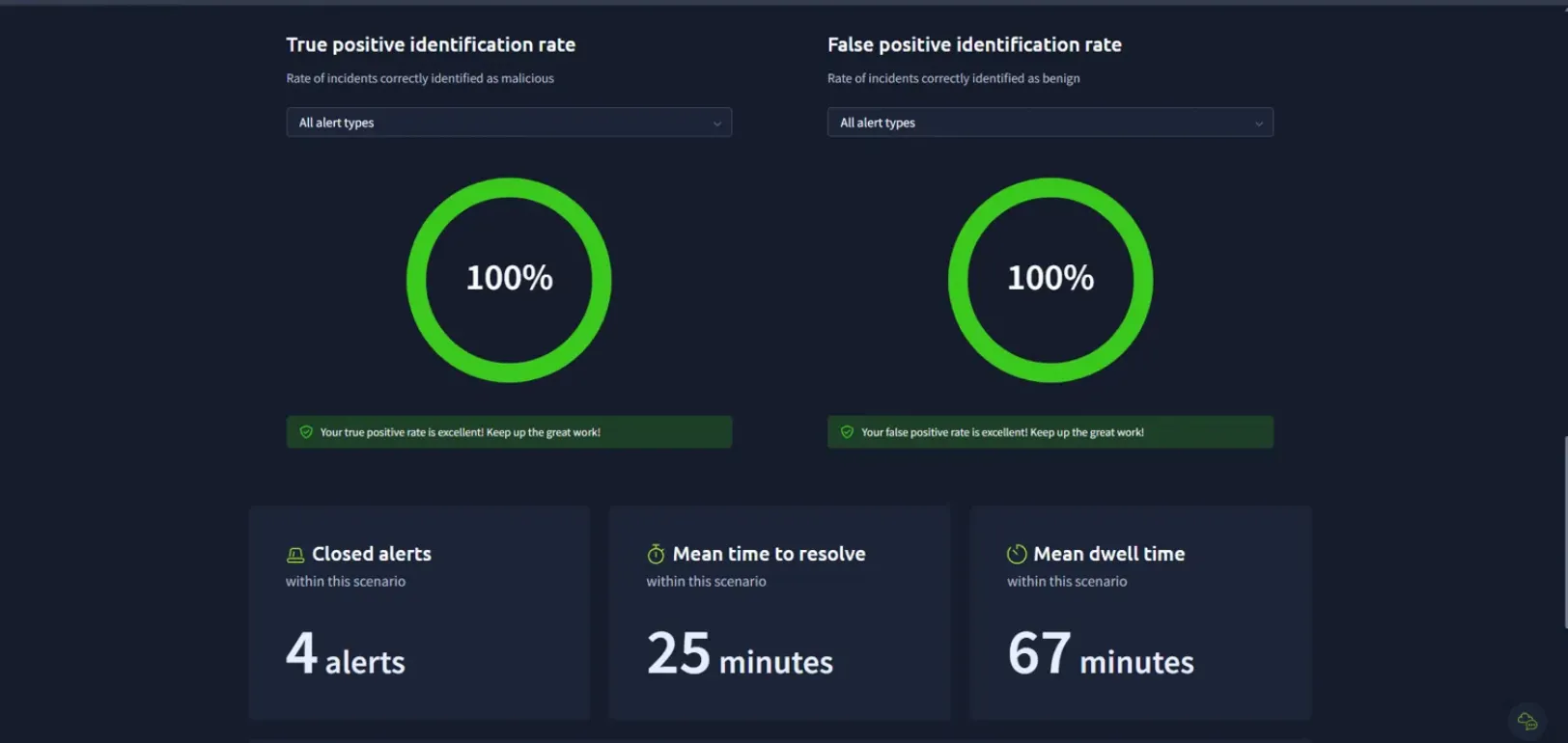
I played the role of a security guard for a company’s computers. The alarm went off 4 times. For each one, I had to decide: is this a real attack or a false alarm? I got every decision right. My reports were not perfect, though, and a big part of this post is about what I missed and how I’ll fix it.
| Result | Value |
|---|---|
| Score | 253 points |
| Alerts closed | 4 |
| Real attacks spotted correctly (true positive rate) | 100% |
| False alarms spotted correctly (false positive rate) | 100% |
| Average time to close an alert (mean time to resolve) | 25 minutes |
| Average time an alert waited before I picked it up (mean dwell time) | 67 minutes |
First: what is a SOC?
Imagine a building with lots of cameras and alarms. Someone has to sit in a room, watch the screens, and decide which alarms matter. That room is a SOC (Security Operations Center), and the person watching is a SOC analyst.
The alarms are called alerts. Most of the job is answering three questions for each one:
- Is it real? (true positive) Or is it a false alarm? (false positive)
- Did anything bad actually happen? (impact)
- Do I need to call someone more senior? (escalation)
How I worked each alert
Every alert followed the same path:
- Read the alert. What rule fired, and why? (alert rule, severity)
- Look at the email. Who sent it, what does it say, and where does the link go?
- Check the logs. Did the person’s computer do anything after the email arrived? (SIEM, the tool that collects all the logs in one place)
- Decide. Real or false alarm? Did anything bad happen? Does a senior need to know?
- Write the report. So the next person can act without asking me questions.
What I learned about reading alerts
1. “New sender” doesn’t mean “bad sender”
Some alarms go off just because an email comes from outside the company, from an address the system has never seen (new external sender).
That’s not proof of anything. A new supplier, a new HR platform, or a welcome email for a new employee can all trigger it. What matters is the content: Does it have strange links? Attached files (attachments)? Does it ask for a password?
If it’s legitimate, the right move is to close it fast and adjust the alarm so it doesn’t keep firing for the same trusted sender (rule tuning). Every minute spent on a false alarm is a minute not spent on a real one.
2. An email and a click are two different things
An email sitting in an inbox is a risk. A click is an action.
When the logs show that someone’s computer connected to the link a few seconds after the email arrived, that’s strong evidence the person clicked. Connecting the email to the click (correlation) turns two separate alarms into one story.
3. What the firewall did changes everything
The firewall is a digital door guard that decides what traffic is allowed in and out of the company.
| The person clicked, and the firewall… | What it means | Next step |
|---|---|---|
| Blocked the connection | The fake page never loaded. The threat is contained. | Close it. Keep the link blocked, check if anyone else clicked, train the user. |
| Allowed the connection | The person may have reached a fake login page and typed their password. | Escalate. The account may be stolen. |
Same email, same click, completely different outcome.
4. If an account might be stolen, a password change is not enough
Lock the door:
- Change the password.
- Log the user out everywhere (revoke sessions and tokens). A new password does not kick out someone who’s already logged in.
- Reset their second login step (MFA), because attackers sometimes add their own phone.
- Block the fake domain, link, and IP address everywhere (firewall, proxy, email gateway).
Check what the attacker did:
- Logins from strange places or devices (sign-in logs, “impossible travel”).
- Hidden rules that forward or delete emails (mailbox rules). Attackers use these to stay hidden.
- Emails sent from this account to coworkers (internal phishing).
- Files that were opened or downloaded.
- Other people who got the same email.
How to spot a fake email (the cheat sheet)
These examples are invented. They are not from the scenario.
| Red flag | Example |
|---|---|
| Sender domain doesn’t match the real brand | paypal-billing.biz instead of paypal.com |
| Letters swapped for numbers (typosquatting) | g00gle-security.co |
| Pressure to act fast (urgency) | “Your account will be closed in 24 hours” |
| Hidden link (URL shortener) | bit.ly/... |
| Asks for your password | “Log in here to verify your identity” |
And the reverse: a new or external sender alone is not a red flag.
What I got wrong
Every classification was right, but my reports lost points. This is the most useful part of the exercise, so here it is honestly.
My weakest report scored 40/100 on details. My best one scored 103/110. The mistakes I made:
- Wrong time. The time I wrote didn’t match the log event.
- Missing the computer address. I named the user but not their computer’s address on the network (internal IP).
- Not saying whether the person clicked, even when the logs showed it.
- Not saying “no impact” when nothing bad happened. Silence is not the same as “nothing happened.”
- Contradicting myself. I said a threat was fully contained, and then listed cleanup steps as if it wasn’t.
- Guessing instead of proving. I escalated one alert saying the account “might be compromised,” instead of pointing to the log that showed why.
The pattern
My thinking was right. My writing had gaps. My best report was the one where I stuck to facts and connected the dots. My worst was the one where I wrote a long list of actions but skipped the basics.
Lesson: a report is only useful if the next person can act on it without asking me questions.
My new report template (the 5 Ws)
From now on, every report answers these before anything else:
| Question | What to write |
|---|---|
| Who? | User and their computer address (internal IP) |
| What? | What happened, including whether the user clicked |
| When? | The exact time, copied from the raw log event, not the alert |
| Where? | Where the traffic went (destination IP / domain) |
| Impact? | Did anything bad actually happen? Say it even when the answer is “no.” |
Then:
- Escalation reason = a fact from the logs, not a guess.
- Remediation = matches the verdict. Contained threat → short list. Possible compromise → full list.
Technical appendix: MITRE ATT&CK
The general phishing techniques this type of scenario covers:
| Technique | ID | In plain words |
|---|---|---|
| Phishing: Spearphishing Link | T1566.002 | Sending a fake email with a dangerous link |
| User Execution: Malicious Link | T1204.001 | The person clicks the link |
| Acquire Infrastructure: Domains | T1583.001 | Buying a look-alike domain |
| Valid Accounts | T1078 | Logging in with a stolen password |
Final thoughts
Since this was my first simulation, I chose to focus on learning the tool rather than on speed. That’s why my average dwell time (67 minutes) is high. I know that in a real SOC, time matters a lot, especially for critical alerts: every minute an alert waits is a minute the attacker keeps working. On the next runs, speed is part of the goal.
This was also an ideal case: the firewall reacted right away. But it shows how something as simple as one phishing email can turn into a much bigger problem if the firewall doesn’t act, or if the logs don’t catch it.
To an analyst, a look-alike domain can seem obviously fake. But a lot of people don’t notice, and they click. That’s exactly why this job exists.
For a simulation, this was a very complete practice. The first of many.